


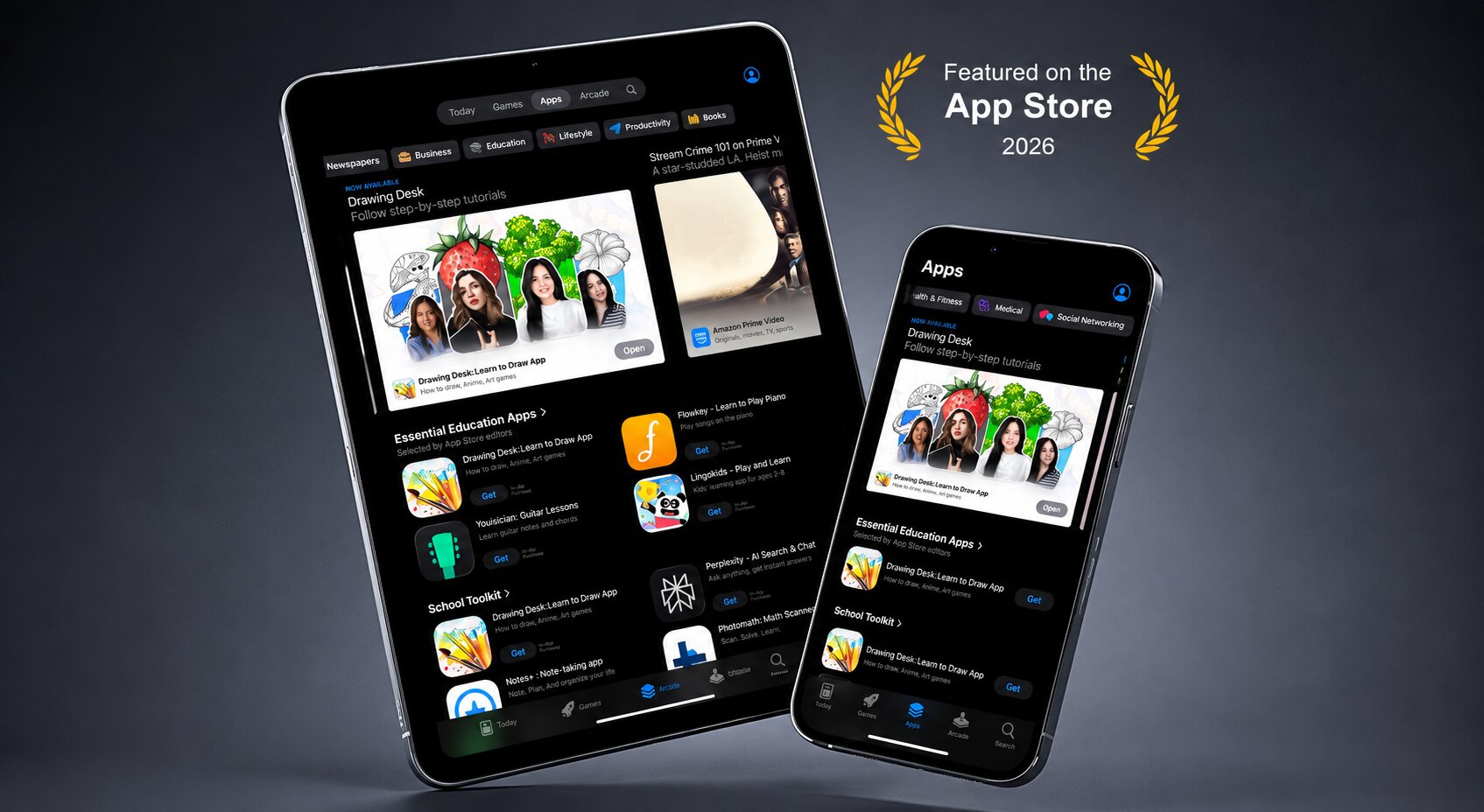
We have some exciting news to share. Apple has officially featured Drawing Desk in two App Store categories: Essential Education Apps and School Tool Kit. This recognition means a great deal to us, not just as a milestone for our team but as a signal that Drawing Desk is making a real difference in how students, kids, and families learn and create through art.
Drawing Desk is more than just a drawing app. It is an educational drawing app designed to help students, beginners, and young artists learn creativity through structured step-by-step drawing lessons.
Apple’s App Store features are editorially curated. They are not paid placements or automated rankings. When Apple highlights an app, it is because its editorial team has reviewed it and found it genuinely valuable for users. Being featured in two education-focused categories at once is something we are incredibly proud of.
Why Did Apple Feature Drawing Desk?
Apple featured Drawing Desk because of its educational value, structured drawing lessons, beginner-friendly experience, and ability to help students develop creativity through guided learning. Drawing Desk combines creative learning, educational art tools, and step-by-step drawing lessons in a way that makes digital art approachable for students of all ages.
What It Means to Be Featured on the Apple App Store
The Apple App Store receives millions of app submissions every year, and only a small number are hand-picked for editorial features. Apple’s team reviews apps based on quality, design, educational usefulness, creativity, and user experience.
For users, a featured app becomes a trusted recommendation. For developers, it is one of the strongest forms of recognition in the mobile ecosystem. Drawing Desk being featured in two educational categories reflects the app’s value as a creative learning app and educational drawing platform for students, teachers, and families.
Featured in Essential Education Apps
The Essential Education Apps category highlights apps that help users build real skills and learn in meaningful ways. Drawing Desk earned its place here through its structured, lesson-based approach to creative education.
Rather than simply offering a blank canvas, Drawing Desk guides learners through step-by-step drawing lessons that improve observation, creativity, spatial reasoning, and artistic confidence. These guided drawing lessons make Drawing Desk an ideal educational drawing app for beginners and students.
From young children learning their first shapes to aspiring artists exploring character design, Drawing Desk supports every stage of the creative learning journey.
Featured in School Tool Kit
Apple’s School Tool Kit is a curated collection of apps designed to support students inside and outside the classroom. Being featured here tells parents, teachers, and students that Drawing Desk is a trusted educational app worth having on a school device.
Whether students are creating visual projects, practicing art skills, designing presentations, or simply enjoying productive screen time, Drawing Desk provides a safe and creative environment for learning.
With Apple Pencil support, Drawing Desk becomes a natural educational drawing app for iPad users learning art digitally.
Why Drawing Desk Belongs in Every Student’s App Collection
Art and creativity are not extras in education. They are essential to how students learn, express themselves, and solve problems. Research consistently shows that creative learning improves cognitive development, emotional expression, and academic engagement.
Drawing Desk was designed to support this type of learning through structured art education and creative skill development.
The app combines:
- Step-by-step drawing lessons
- Creative learning tools
- Guided practice
- Beginner-friendly drawing courses
- Productive screen time for kids and students
This makes Drawing Desk one of the best educational drawing apps for students and families.
Helping Students Around the World Learn Creativity
Drawing Desk is used by learners worldwide. With multilingual support, accessible drawing lessons, and availability across iOS, Android, and Web, students from different countries can explore creativity regardless of their experience level.
Creative learning is universal, and Drawing Desk helps students globally build confidence through art, imagination, and visual storytelling.
Features That Make Drawing Desk Educational
Here are some of the features that make Drawing Desk a standout educational drawing app:
- Structured drawing courses: Progressive lessons designed to build skills step by step.
- Creator Community: Lessons created by real artists with different styles and techniques.
- Draw Kids: A safe and kid-friendly drawing experience for younger learners.
- Professional drawing tools: Brushes, layers, color palettes, and advanced creative features.
- Apple Pencil support: Natural digital drawing experience on iPad.
- Cross-platform access: Available on iOS, Android, and Web.
- Productive screen time: Encourages creativity and learning instead of passive scrolling.
Drawing Desk for Students, Parents, and Teachers
Drawing Desk is designed for everyone involved in creative learning.
Students can learn drawing step by step through structured lessons. Parents can feel confident knowing their children are spending time on educational and creative activities. Teachers can use Drawing Desk as a classroom-friendly tool for visual projects and creative exercises.
Whether you are a beginner artist, a student exploring digital art, or a parent searching for educational apps for kids, Drawing Desk offers a complete creative learning experience.
Ready to Start Drawing?
Download Drawing Desk and explore the educational drawing app recognized by Apple as part of Essential Education Apps and School Tool Kit. Whether you are a student, parent, or teacher, Drawing Desk makes creative learning simple, engaging, and accessible.
Frequently Asked Questions
Why was Drawing Desk featured in Apple’s Essential Education Apps?
Apple featured Drawing Desk because of its educational value, structured drawing lessons, creative learning tools, and beginner-friendly experience for users of all ages.
What is the Apple App Store School Tool Kit?
School Tool Kit is a curated App Store category where Apple highlights trusted educational apps that support classroom learning, creativity, and productivity for students.
Is Drawing Desk good for students and classroom use?
Yes. Drawing Desk offers guided drawing lessons, educational creative tools, and beginner-friendly learning experiences that work well for classrooms, home learning, and creative projects.
Is Drawing Desk free to download?
Yes. Drawing Desk is free to download on iOS and Android, with additional premium lessons and tools available inside the app.
What age group is Drawing Desk best for?
Drawing Desk is suitable for children, teenagers, beginners, and even experienced artists. The Draw Kids section is designed specifically for younger learners.


